The right Nintendo Switch accessory is not the flashiest one. It is the one that removes a real annoyance. A scratched screen, limited storage, dead Joy-Con batteries, cramped hands in handheld mode or a messy travel bag can all make the console feel harder to use than it should. This guide sorts the most useful accessories from the nice extras, with practical options for Nintendo Switch, Nintendo Switch OLED and Nintendo Switch Lite owners.
Quick comparison: which Nintendo Switch accessory should you buy first?
If you are buying for yourself, start with the problem you want to solve. If you are buying a gift, choose something broad: a case, a screen protector, a microSD card or an extra controller. These are useful even when you do not know every detail of the player’s habits.
| Accessory | Best for | Compatibility notes | Priority |
|---|---|---|---|
| Tempered glass screen protector | Scratch protection in handheld and travel use | Check the size for Switch, Switch OLED or Switch Lite | Essential |
| Carrying case | Transporting the console, games and cables | OLED models may need a slightly different fit | Essential |
| microSD card | Digital games, DLC, screenshots and downloads | Works across Switch models | Essential for digital buyers |
| Pro-style controller | Long docked sessions and precise controls | Switch Lite needs wireless controller support and a stand | High |
| Charging station | Families, local multiplayer and spare Joy-Con pairs | Choose one designed for Joy-Con or controllers | High for multiplayer |
| Power bank | Travel and long handheld play | Look for reliable USB-C charging | Travel essential |
| Foldable stand | Tabletop mode, hotels, trains and shared screens | Especially useful for Switch Lite | Optional but practical |
| Thumb grips or ergonomic grip | Comfort during handheld play | Fit differs between Joy-Con and Lite controls | Comfort upgrade |
The essentials: protection, storage and everyday reliability
Screen protector: small cost, big peace of mind
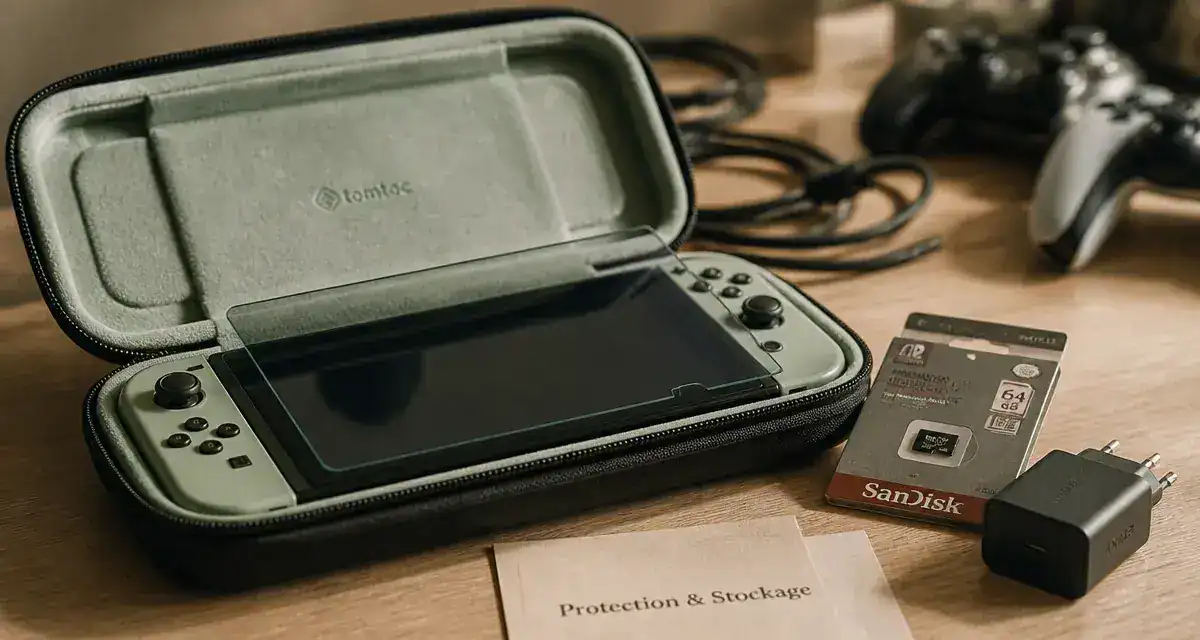
A tempered glass screen protector is one of the safest first purchases for a Nintendo Switch. The console goes into docks, bags, cases and children’s hands, so the screen gets exposed to scratches more often than a TV-only console. Tempered glass feels closer to the original display than soft plastic film and is easier to wipe clean after fingerprints.
Nintendo Switch 2 Accessory Compatibility Guide : Check the official list of Nintendo Switch accessories that are compatible with the new Nintendo Switch 2 console.
Compatibility matters. A protector made for the standard Nintendo Switch may not align perfectly with the Nintendo Switch OLED display, and the Nintendo Switch Lite has its own dimensions. Before buying, check the model name rather than relying only on the word “Switch” in the listing. Model fit is the detail that saves frustration later.
Carrying case: the accessory that prevents accessory chaos
A good carrying case should do more than hold the console. Look for a firm outer shell, a soft screen flap, slots for game cards and enough room for a cable or earbuds without pressing against the sticks. For travel, a shock-resistant case is better than a slim pouch. For daily commuting, a thinner case may be easier to slip into a backpack.
For kids, durability matters more than elegance. Zippers, elastic straps and internal dividers make a difference because the case will often be opened on sofas, car seats and kitchen tables. If the console mostly stays at home, a simple game card case may be enough. For portable use, console protection comes first.
microSD card: the upgrade digital players notice fastest
A microSD card expands storage for digital games, downloadable content, screenshots and updates. It becomes important as soon as the player buys games from the Nintendo eShop or keeps several large titles installed at the same time. Physical cartridge players can wait longer, but even they may eventually need more space for updates and downloadable content.
Brands such as SanDisk and Samsung are common choices, but the key is to buy from a reliable seller and avoid suspiciously cheap cards. A fake or unstable card can cause download errors and wasted time. For gift buyers, a microSD card is a safe, compact present because it works across Nintendo Switch, Nintendo Switch OLED and Nintendo Switch Lite. Storage expansion is one of the easiest upgrades to understand.
Comfort and control: make long sessions feel less cramped
Pro Controller or third-party controller?
The Nintendo Switch Pro Controller is the most obvious comfort upgrade for docked mode. It has a full-size shape, traditional sticks and buttons, and it suits long sessions better than detached Joy-Con for many players. It is especially useful for action games, racing games, platformers and anything that needs precise movement.
Third-party controllers from brands such as PowerA, HORI or 8BitDo can offer better value, extra colors or features like programmable buttons. Some models use Hall effect joysticks, a technology often associated with reduced stick drift risk compared with standard joystick mechanisms. The trade-off is simple: features vary. Not every controller includes motion controls, vibration, amiibo support or wake-from-sleep functions. Read the feature list carefully instead of assuming every controller behaves like Nintendo’s official one.
Grips, thumb caps and handheld comfort
If handheld mode is your main way to play, an ergonomic grip can matter more than a premium controller. The flat edges of the console are portable, but they are not ideal for longer sessions. A grip adds palm support and reduces the pinched feeling some players get after holding the console for a while.
Thumb grips are cheaper and smaller. They improve traction, protect the stick surface and make the controls feel more secure, especially for children or players with sweaty hands. Just make sure they fit the right control type. Joy-Con caps and Nintendo Switch Lite caps are not always interchangeable. Handheld comfort is often the difference between a short session and a long one.
Think of your accessory setup as a sequence rather than a shopping list. The case protects the console before the session starts, the stand sets the angle, the controller handles the longer play, the charger resets everything afterward, and the microSD card keeps the library ready. When one part is missing, the routine becomes less smooth. The simplest way to avoid overbuying is to choose the accessory that fixes the point where play usually stops, stalls or becomes irritating.
Charging, docks and power: convenience without taking risks
Charging stations for Joy-Con and controllers
A charging station is not essential for a solo handheld player, but it becomes very useful in a family or multiplayer setup. When several Joy-Con pairs are used for party games, a dock keeps them visible, charged and ready instead of scattered across drawers. It also reduces cable clutter around the TV.
Choose a station designed for the devices you actually own. Some charge Joy-Con only, some charge Pro-style controllers, and some combine both. Indicator lights help, but stability matters more: controllers should slide in easily without forcing the connectors. A good station makes charging feel effortless.
USB-C chargers, power banks and portable play
A USB-C charger or power bank is valuable for players who travel, commute or play away from a wall outlet. For safety, avoid no-name chargers with vague specifications. Reliable USB-C Power Delivery support is preferable for charging accessories, especially when powering a console rather than just a phone.
Power banks can extend handheld playtime, but size and weight matter. A huge battery may look impressive on paper and still be annoying in a small travel bag. For most players, the best portable power accessory is one they will actually carry: compact, well-built and paired with a short USB-C cable. Portable power should stay simple.
Be careful with third-party docks
Third-party docks can be convenient, especially compact travel docks, but they deserve more caution than cases or thumb grips. A dock is part of the charging and video-output chain, so build quality and compatibility matter more. If you want a dock alternative, choose a reputable brand, check model compatibility and avoid products that make unclear claims about power or display output.
Travel, family play and gifts: match the accessory to the player
For travelers: compact and protective beats bulky
The best Nintendo Switch travel accessories are the ones that reduce friction: a sturdy case, a compact USB-C charger, a short cable, a power bank and a foldable stand. Headphones are also useful for trains, flights and shared rooms. If you often use tabletop mode, a stand with a stable viewing angle is much better than relying on the built-in kickstand, especially with the Nintendo Switch Lite.
A travel setup should stay minimal. If every accessory needs its own pouch, the console stops feeling portable. Prioritize items that solve multiple problems: a case with game storage, a stand that allows charging while playing, or a charger that can also power other USB-C devices. Travel convenience comes from fewer moving parts.
For families and multiplayer: durability first
Families should focus on accessories that keep play sessions simple: extra controllers, Joy-Con straps, a charging station and a protective case. Extra controllers are often more useful than decorative accessories because they immediately open local multiplayer. For younger players, durable shells and easy-to-clean grips can also be worth considering.
When buying for shared use, avoid accessories that are too specialized. A premium controller may be perfect for one player, but two affordable controllers may be more useful for a household that plays party games. The best value depends on how many people will use the console at the same time. Local multiplayer changes the priority list fast.
For gifts: choose universal, not risky
If you do not know the exact console model, stay with accessories that are broadly useful: microSD cards, game card cases, controllers with clear compatibility, or Nintendo eShop gift cards. For physical accessories like screen protectors and fitted cases, confirm whether the recipient owns a Nintendo Switch, Nintendo Switch OLED or Nintendo Switch Lite.
Official Nintendo accessories offer reassurance, while reliable third-party accessories can deliver better value. The safest rule is simple: buy official when charging, docking or compatibility is critical; consider reputable third-party brands for cases, grips, stands, controllers and storage accessories where the value is strong and the specifications are clear.